





Often, while watching a drama or a movie, my partner would ask me to turn up the volume as he could not hear the conversation clearly. But as I turn up the volume, the audio gets too loud as soon as the music plays or an action sequence starts, so I need to re-tune it – but then I can’t hear the dialogue. It’s a frustrating experience.
Muffled dialogue is a constant problem on TVs, and even investing in a decent Samsung sound system doesn’t completely fix the problem. So, I started tweaking the built-in audio settings on my smart TV to find a balance between clear dialogue and good audio. All I had to do was change three simple settings.
Change the sound mode
Smart TVs have multiple sound modes
Most smart TVs come with several preset sound modes such as Standard, Cinema, Sports and Clear sound. The default is usually Standard or Cinema, which is better for a balanced or bass-heavy audio experience. It sounds great for music and action scenes in ways, but it’s not ideal when you want to hear what the characters are actually saying.
The trick is to switch to a mode that emphasizes the mid and high frequencies, where human speech resides. On my Samsung TV, I changed from standard Ensplife mode, and the difference was noticeable. Samsung’s own documentation recommends this mode when voices are difficult to understand, as it boosts tones that help speech over background noise.
If you have an LG TV, search clear voice or Clear Voice Pro In your sound settings. Sony TVs have a similar option, sometimes called dialogue or voice mode, as well Sound zoom A feature that lets you adjust the volume of each item separately. The exact step varies by brand, but you’ll usually find them below Settings > Sound > Sound Mode.
I would recommend testing different modes while watching something with heavy dialogue. News broadcasts work well for this because they mostly deliver speech with minimal background noise. Once you find a mode that makes the conversation easier to understand, stick with it for a week and see if it makes a difference.
Set a constant volume
Let your TV manage the volume level automatically

I kept the remote in my hand for every movie because I knew I needed it. Dialogue scenes required cranking the volume up to 70 or so, and then an explosion hits, and suddenly I’m scrambling to turn it down before waking the neighbors. Modern films are mixed for large dynamic range cinemas, which means the distance between quiet dialogue and fast action is deliberate. Great for theaters, not so great for watching John Wick at 10pm.
This is where the auto volume feature comes in. It’s basically a built-in compressor that keeps the loud and quiet parts closer together. Instead of your volume scale sitting at 30 and blasting at 100, everything is squeezed into a narrower, more manageable window. The quiet bits are picked up so you can hear the spoken lines without the loud bits being painful.
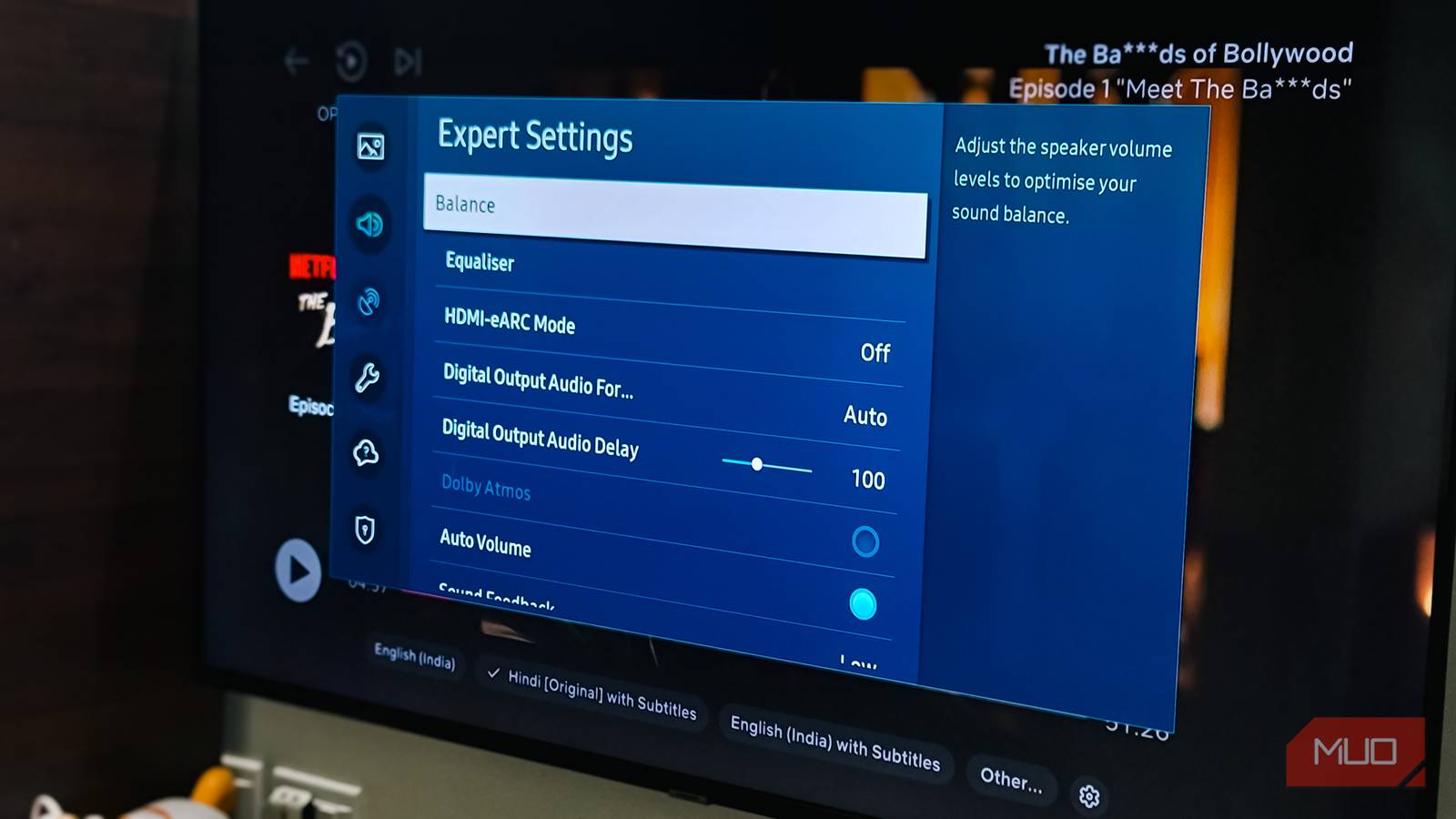
On a Samsung TV, you’ll find it under Settings > All Settings > Sound > Expert Settings > Auto Volume. Make sure it is set But. Some TVs call this Night Mode instead, and it essentially does the same thing by reducing the dynamic range.
One thing to keep in mind is that if you switch from TV speakers to a sound bar, the auto volume may be lost. This is because some soundbars have their own dynamic range features with names like Trovelum or Night Mode. If auto volume isn’t available on the TV itself, check your sound bar’s settings.
Use the equation
Tuning specific frequencies for better sound clarity

If changing the sound mode and turning on auto volume still makes dialogue sound muddy, equalization can help. This is where you can target specific frequencies that make speech easier to understand.
Human speech, especially those that help us distinguish between words, mostly sits in the 1-4 kHz range. Boosting these frequencies can give dialogue more clarity. At the same time, lowering the bass below 80 Hz can reduce the boom that often drowns out quiet speech.
On my Samsung sound system, I initially tried boosting the 150 Hz and 300 Hz bands, thinking that would make the sounds richer. It added some warmth, but it also made everything a mess. Those frequencies are where booms and background noise come alive in the room, so cranking them up just added more competition for dialogue. A better approach is to keep these bands neutral or slightly lower while boosting the high frequencies where speech clarity actually comes alive.
The head Settings > Sound > Expert Settings > Equalizer If you have a soundbar on your TV, check its app or remote for EQ controls. Start with a little boost around the 2-3 kHz range and watch the dialog become clearer. If the sound feels boomy, lower the lowest frequency. Small adjustments work better here than dramatic changes.
If you’re already using a soundbar
You still need to tweak some settings

A soundbar is one way to get clear audio, but even with one, you may need to adjust some settings to get the best results. One setting that’s often overlooked is the audio output format on your TV, so switching between PCM and Bitstream can make a big difference in how your soundbar handles dialog.
If your sound bar supports surround formats such as Dolby Atmos or DTS:X, set your TV to Bitstream or Auto So the soundbar can decode the entire audio mix. If you’re using a simple stereo soundbar or notice lags and glitches, try switching PCM Instead, beyond that, most soundbars are buried in definition boost or clear sound mode settings.
These opportunities help, but they are not a complete fix
These settings have improved the stuttering dialogue problem on my TV to a significant degree. I no longer have to carry the remote for every movie, and my partner has stopped asking me to change the volume during conversation scenes.
That said, the problem may not be with your TV at all. Some streaming platforms compress audio more aggressively than others, and some movies are simply mixed with a very wide dynamic range that no setting can fully control. If you’re still having trouble hearing dialogue on your smart TV, a soundbar with built-in compression and a dedicated center channel is a more reliable long-term solution.