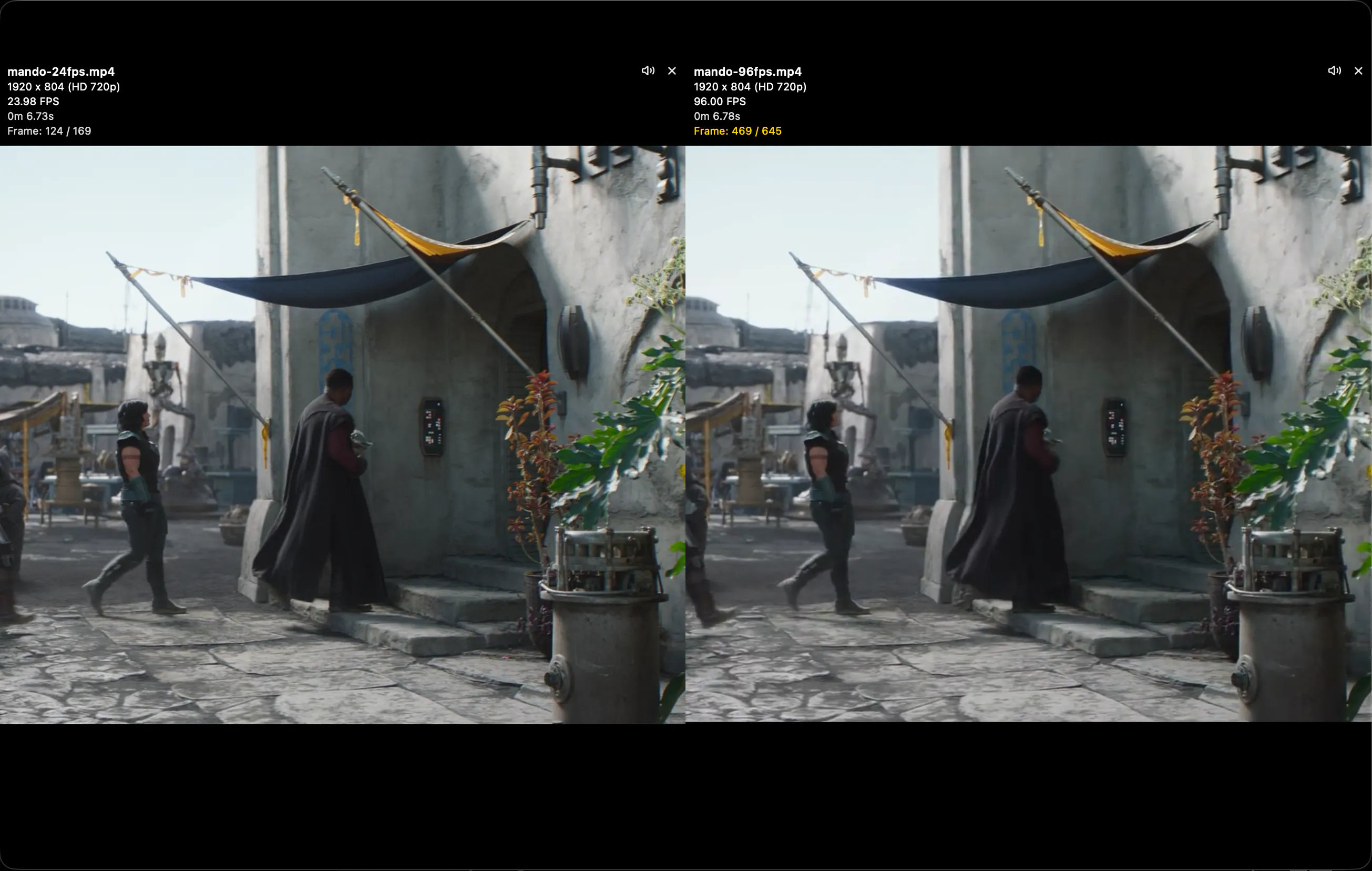
@qifengzheng Thanks! You are correct and I ran into this myself while reviewing interpolated videos. The app syncs on timestamps, not frame numbers. There is a single global timeline during playback, and each clip maps that timeline to its source time. Frame stepping uses the highest fps clip, so if you’re comparing 100 fps versus 25 fps, a 25 fps clip only advances every 4 key presses while a 100 fps clip advances every press.
I added an overlay showing the current frames, total frames, and FPS of each video, which makes it really clear.
Pixel Difference mode is also incredibly useful here—you can literally watch clips differ between matching frames, then return to the same whenever they land on the same source frame.
Every time you pause, play or scrub, each clip is re-located to the correct timeline position. Playback startup is also staggered dynamically — the more videos there are, the more the startup is spread out (up to ~100ms for large sessions) to reduce decode spikes / overload and subsequent desync. Each clip is compensated for its start delay so they still start in sync. Together, these help keep everything aligned while reducing decode spikes and improving playback with multiple high-resolution videos on older hardware.
Pixel Diff Mode 🙂

Video metadata overlay 🙂